

If you don’t have someone to speak English with or it’s difficult to meet in person, you can practice speaking with the Cake app. In fact, various studies have highlighted the improvement in ‘speaking skills‘ when using the Cake app for English learning, and results showed enhanced English speaking skills after using it for at least 10 minutes daily. Let’s take a look at how you can practice speaking with the app.
1. Choose a Course

In the Cake app, you can select courses that match various levels and topics. The difficulty level can be adjusted based on your proficiency, and you can choose courses based on your areas of interest. You can study multiple courses at once, and your progress is automatically saved, allowing you to choose the courses you want to study at any time.
2. Select an Episode
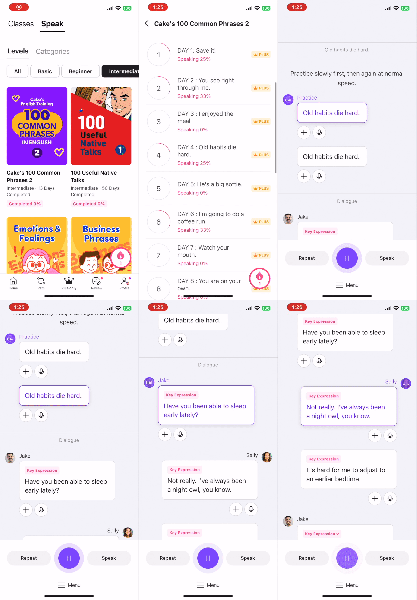
Each course is composed of several episodes. After selecting an episode, you can tap on each speech bubble to listen to the audio recorded by real native speakers. Listen to the natural pronunciation and intonation, and try to mimic the key expressions and vocabulary.
3. Pronunciation evaluation
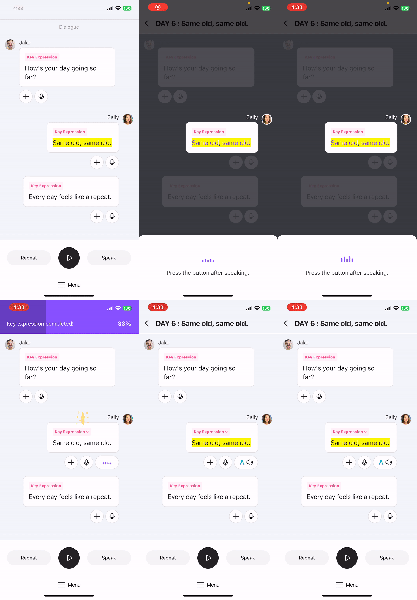
There are two methods to record pronunciation in the Speak course. The first method is to press the “microphone” button under each speech bubble to record your voice for each sentence. The AI engine then evaluates your pronunciation and provides feedback.

The second method is to press the “Speak” button at the bottom to engage in role-playing, recording your voice in a full conversation. Again, the AI engine assesses your pronunciation and provides feedback. You can also switch roles in the conversation. All recorded voices can be replayed for review.
4. Repeat and Revise

In the app, you can access your history of studied episodes in the “Review” tab. Here, you can review each episode by listening to it again. You can also come back and review the sentences you saved by pressing the + button, which appear under “My Sentences.”

“My Sentences” includes sentences saved not only from Speak but also from video content. Try reviewing them through random quizzes. Regular revision enhances memory and sets a strong base to learn and input more information.
By practicing speaking with the Cake app for a little bit each day, you’ll become familiar with various patterns and gain confidence in using English in real situations. Don’t hesitate—start right away!

*Currently, Cake’s Speak content is exclusive to “Cake Plus” subscribers.
- Preply: Prices vary by tutor, ranging from $0.75 to $33.45 per 50-minute lesson.
- Lingoda: $35 per 60-minute lesson (when purchasing 5 classes at once).
Subscribing to Cake Plus for approximately $6 per month allows you to access all Speak content as well as over 20,000 other pieces of content without limitations. Subscribing to Cake’s membership at a reasonable price and starting effective English studies would be a great idea. (Prices may vary by country and OS, so it’s best to check directly in the app.)

